Web scraping is the automated extraction of data from websites: a program requests a page the same way a browser does, reads the HTML that comes back, pulls out the specific values it was told to find, and writes them somewhere structured — a CSV, a database, a JSON payload feeding another system. It replaces the copy-and-paste a human would otherwise do, at a scale a human never could.
This guide covers what a web scraper actually does, what businesses use scraped data for, how scraping differs from crawling and from using an API, what makes it hard in practice, and where the legal boundaries sit.
Key Takeaways
- A scraper is four steps: fetch → parse → extract → store. Everything else — proxies, headless browsers, retries — exists to keep step one working.
- Crawling discovers URLs; scraping extracts values from them. Most real projects do both, but they're separate jobs with separate failure modes.
- If a site offers an API with the data you need, use it. Scrape when there's no API, when it's paywalled or rate-limited below your needs, or when it omits fields the page shows.
- Roughly half of pages worth scraping today need JavaScript execution. A
requests.get()on a React or Vue site returns an empty shell, not the content you saw in the browser. - Start with plain HTTP requests and datacenter IPs. Escalate to a headless browser only when the HTML is empty, and to residential IPs only when you actually see 403s — each step up costs 5–10× more per page.
- Scraping public data is broadly lawful in the US after hiQ v. LinkedIn, but "public" does the heavy lifting: logins, personal data, and copyrighted content each carry separate risk.
What is a web scraper?
A web scraper is a program that reads web pages for a machine instead of a person. It's usually three small pieces glued together:
- An HTTP client that requests the page (Python's
requests,curl,fetch). - A parser that turns the returned HTML string into a navigable tree (Beautiful Soup, lxml, Cheerio).
- Selectors — CSS or XPath expressions — that name the parts of that tree you want.
Here's a complete, working scraper in twelve lines. It runs against quotes.toscrape.com, a sandbox built for this purpose:
import requests
from bs4 import BeautifulSoup

response = requests.get("http://quotes.toscrape.com/")
response.raise_for_status()
soup = BeautifulSoup(response.text, "html.parser")

for quote in soup.select("div.quote"):
    print({
        "text": quote.select_one("span.text").get_text(strip=True),
        "author": quote.select_one("small.author").get_text(strip=True),
        "tags": [t.get_text() for t in quote.select("a.tag")],
    })
That is genuinely the whole idea. If you want the parsing layer in more depth, see our guides to Beautiful Soup and XPath selectors.
How does web scraping work?
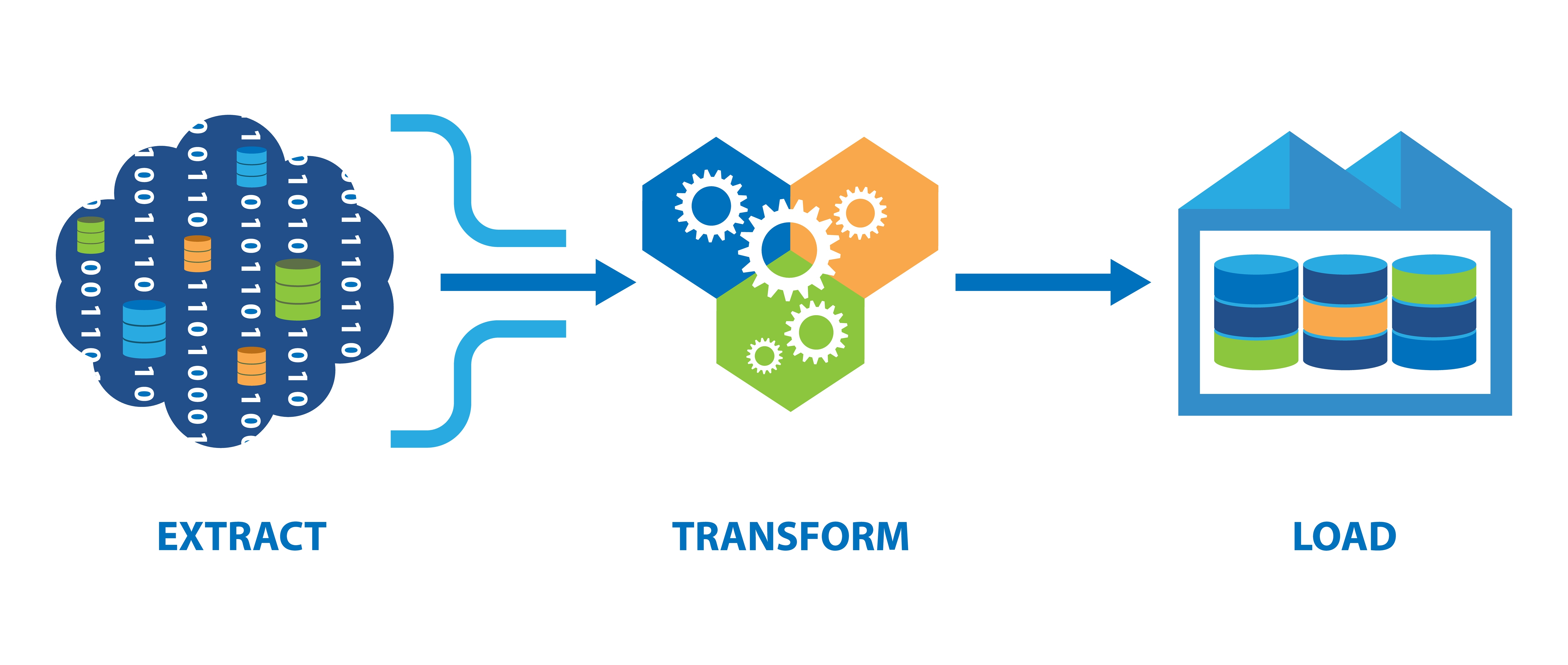
Every scraper, from a ten-line script to a distributed pipeline, runs the same four stages.
1. Fetch. Send an HTTP GET (sometimes POST) to a URL. The server returns a status code and a body. This is the stage that breaks: you'll meet 403s, 429s, CAPTCHAs, and TLS fingerprint checks here, not in the parsing code.
2. Render (conditionally). If the site builds its content in the browser with JavaScript, the HTML from step one is a near-empty shell. You need a real browser engine — Playwright, Puppeteer, Selenium — to execute the scripts before the content exists. The quickest test: curl the URL and search the output for text you can see on screen. If it's absent, you need rendering. Our headless browser guide covers the options.
3. Parse and extract. Load the HTML into a parser and address the values with selectors. div.product h2.title and //div[@class="product"]/h2 express the same intent in CSS and XPath.
4. Store. Write to CSV, JSON, or a database. Do it incrementally — a scraper that holds 100,000 records in memory and writes at the end loses everything to one crash.
Web scraping vs. crawling vs. APIs
These three get conflated constantly, and the distinction determines how you build.
| What it does | Output | When to use it | |
| Crawling | Follows links to discover URLs | A list of pages | You don't know the URLs yet |
| Scraping | Extracts named values from a page | Structured records | You know the pages, want the data |
| API | Requests data the site publishes deliberately | JSON, already structured | The API exists and covers your fields |
A search engine crawls: it maps the web without caring what any page means. A price monitor scrapes: it knows the twelve product URLs and wants the number in the price element. A store's public product API is neither — it hands you clean JSON with a documented contract and no parsing.
The decision rule: check for an API first. An official API is faster, more stable, and unambiguously permitted. Scrape when no API exists, when its rate limits or pricing don't fit, or when the page displays fields the API withholds. Also check for an undocumented one — open your browser's Network tab and filter to XHR/Fetch. Sites that render client-side almost always fetch their data from a JSON endpoint you can call directly, which is far more robust than parsing their markup.
What is web scraping used for?
The data is a means to a decision. These are the applications that recur across industries, with what each actually collects:
| Application | What gets extracted | Who uses it |
| Price monitoring | Competitor prices, stock status, promotions | E-commerce, retail, MAP enforcement |
| Lead generation | Company names, roles, contact details from directories | B2B sales, CRM enrichment |
| Job listing aggregation | Titles, employers, locations, posted salaries | Job boards, salary benchmarking |
| SERP monitoring | Ranking positions, featured snippets, ad copy | SEO teams, competitor content analysis |
| Brand sentiment tracking | Reviews, mentions, ratings across platforms | Marketing, PR, product |
| Property listings | Prices, square footage, days on market | Real estate, rental analysis |
| Alternative data | Store counts, hiring velocity, inventory depth | Hedge funds, equity research |
| RAG knowledge bases | Clean article and documentation text | AI teams, LLM training data |
The last row is the one that changed most recently. Retrieval-augmented generation needs current, clean text from sources a model wasn't trained on, which has made "turn this URL into readable text" a first-class engineering requirement rather than a marketing side-quest. See web scraping for machine learning for how that pipeline is built.
What makes web scraping hard?
Writing the selectors is the easy part. Four things account for most of the difficulty:
JavaScript-rendered content. Content assembled in the browser isn't in the initial HTML response. Rendering it costs roughly an order of magnitude more time and memory than a plain fetch, so only turn it on for pages that need it.
Anti-bot systems. Cloudflare, DataDome, and PerimeterX fingerprint TLS handshakes, header ordering, and browser APIs. A default python-requests User-Agent is an immediate tell — see user agent rotation for the baseline fix.
IP blocking. Hundreds of requests from one address gets that address blocked. Proxies distribute traffic across many IPs; our proxy types guide covers the differences.
Breakage. Sites redesign, and selectors that depended on the old markup silently return nothing. Alert on zero results, not just on errors — a scraper returning empty records looks healthy to a naive health check.
A cost-aware escalation ladder, cheapest first:
- Plain HTTP + a realistic User-Agent + datacenter IPs.
- Add a headless browser — only if the HTML arrives empty.
- Switch to residential IPs — only once you actually see 403s or CAPTCHAs.
Most engineers jump straight to a full browser on residential proxies and pay 25× more than the page required.
Has AI changed web scraping?
It has changed the extraction step, not the fetching step — which is worth being precise about, because the fetching step was always the hard one.
What genuinely improved: you can now describe the fields you want in plain language instead of writing and maintaining CSS selectors. That removes the most brittle part of a scraper, since an LLM reading a redesigned page still finds the price, while a hardcoded .price-now selector doesn't.
What hasn't changed: a language model can't get you past a Cloudflare challenge or an IP ban. It only sees content something else already fetched. Anyone claiming AI made scraping infrastructure obsolete is describing the half of the problem that was already solved.
Here's selector-free extraction against our AI scraping endpoint:
import requests

response = requests.get(
    "https://api.webscraping.ai/ai/fields",
    params={
        "api_key": "YOUR_API_KEY",
        "url": "https://example-shop.com/product/123",
        "fields[name]": "Product name",
        "fields[price]": "Current price in USD, digits only",
        "fields[in_stock]": "true if the product is purchasable, else false",
    },
    timeout=60,
)
print(response.json())
# {"name": "Wireless Headphones", "price": "79.99", "in_stock": "true"}
The same request handles the proxy rotation, browser rendering, and retries — the parts an LLM can't do for you. Every endpoint also ships as an MCP server and an n8n node if you're wiring scraping into an agent or an automation instead of a script.
Is web scraping legal?
Short version: scraping publicly accessible data is broadly lawful in the United States, and the leading case is hiQ Labs v. LinkedIn, where the Ninth Circuit held that scraping a public profile isn't "unauthorized access" under the Computer Fraud and Abuse Act. That's a real protection, but it's narrower than the headlines suggested.
The risk lives in four places the CFAA question doesn't touch:
- Authentication. Data behind a login is not public. Creating accounts to reach it converts a scraping question into a contract and access question.
- Personal data. GDPR and CCPA apply to scraped personal information exactly as they do to any other collection method. Publicly visible does not mean freely processable.
- Copyright. Facts aren't copyrightable; the article text expressing them is.
- Terms of service. Breaching them is generally a contract matter rather than a criminal one, but it's still a live claim.
Practical guardrails: read robots.txt, rate-limit yourself well below what would degrade the site, prefer an API where one exists, and don't collect personal data you have no use for. For the full treatment, see is web scraping legal.
How to start scraping
If you're writing code, the fastest useful path is Python: requests plus Beautiful Soup for static pages, Playwright when JavaScript is involved. Our Python web scraping guide walks through a complete project, and the library comparison covers when Scrapy earns its complexity. JavaScript developers should start with the JS library overview.
If you'd rather not run browsers and proxy pools, a scraping API collapses the fetch and render stages into one HTTP call:
import requests

response = requests.get(
    "https://api.webscraping.ai/text",
    params={
        "api_key": "YOUR_API_KEY",
        "url": "https://example.com/article",
        "js": "true",              # render JavaScript (default)
        "proxy": "datacenter",     # residential and stealth also available
        "text_format": "plain",
    },
    timeout=60,
)
print(response.text)
Credits are charged per request on a published table — 1 for a datacenter request without JavaScript, 5 with it, 10 and 25 for residential, 50 for stealth, plus 5 for AI extraction. Failed requests cost nothing. The free tier is 2,000 credits a month with no credit card, which is enough to build and test a real scraper before deciding anything.
Frequently Asked Questions
What is web scraping in simple terms?
It's software that reads a website and saves specific pieces of it — prices, titles, reviews — into a spreadsheet or database automatically, instead of a person copying them by hand.
What is the difference between web scraping and web crawling?
Crawling discovers URLs by following links; scraping extracts specific values from pages you already have. A search engine crawls. A price tracker scrapes. Pipelines that need both usually crawl first, then scrape the results.
Do I need to know how to code to scrape a website?
No. Browser extensions and visual tools handle simple, one-off extractions, and automation platforms like n8n connect scraping to other systems without code. Code becomes worthwhile when you need scheduling, volume, or resilience to site changes.
Why does my scraper return an empty page?
Almost always JavaScript rendering. The content you see in the browser is built after the initial HTML loads, so a plain HTTP request never receives it. Confirm by running curl on the URL and searching for text you can see on screen; if it's missing, you need a headless browser or a rendering API. The other common cause is an anti-bot block returning a challenge page with a 200 status.
Can ChatGPT scrape a website?
It can read a page you give it and pull structured fields out of the text, which is the extraction half. It doesn't provide proxies, browser rendering, or retry logic, so it won't reach pages that block automated traffic. In practice, models handle extraction while a scraping layer handles fetching.
How much does web scraping cost?
Self-hosting costs proxy fees plus the engineering time to maintain it, which is usually the larger number. Hosted APIs charge per request, typically scaling with whether you need JavaScript rendering and what class of IP you use. Our plans start at $29/month for 250,000 credits, with a free tier of 2,000 credits.
Ready to scrape without managing infrastructure? Get a free API key — 2,000 credits a month, no credit card — and read the API documentation to make your first request in a couple of minutes.
