Start with datacenter proxies. Move to residential only once a target actually returns 403s or CAPTCHAs. Reserve mobile for the handful of sites that defeat both. That escalation ladder — not a provider shootout — is the decision that determines whether a scraper costs $30 a month or $3,000, and most projects skip straight to the expensive rung out of caution.
This guide covers the proxy types you'll actually encounter, how each one is priced, the failure mode that eventually forces you off it, and the rules for deciding between them.
Key takeaways
- Datacenter proxies are priced per IP per month; residential proxies are priced per gigabyte. That difference, not the headline rate, is what blows up budgets — a 2 MB page fetched 100,000 times is 200 GB of residential traffic.
- Escalate on evidence, not on nerves. Switch a target to residential when datacenter requests start failing, not because the domain "looks protected."
- ISP proxies are the middle rung most guides skip — datacenter-hosted IPs registered to a consumer ISP, so they pass network-reputation checks at per-IP pricing and datacenter speed.
- Rotation policy follows the site, not the proxy. Rotate every request on anonymous listing pages; hold a sticky session for anything behind a login or a multi-step checkout.
- Track proxy failures per target host, not globally. An IP burned on one retailer is usually still perfectly good on every other domain.
- A proxy does not hide a bot. If residential IPs get blocked too, the tell is your TLS fingerprint, headers, or headless browser — not your IP.
What does a proxy actually do for a scraper?
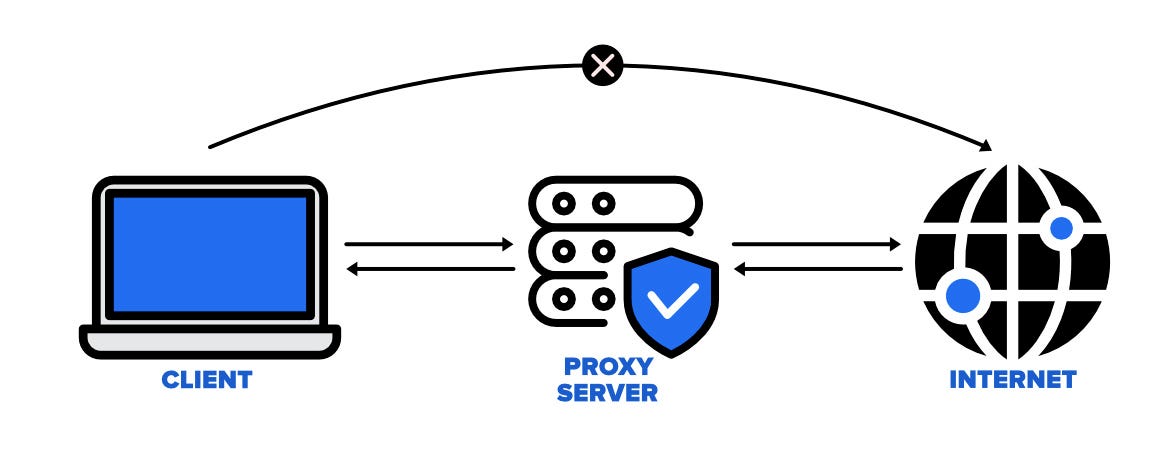
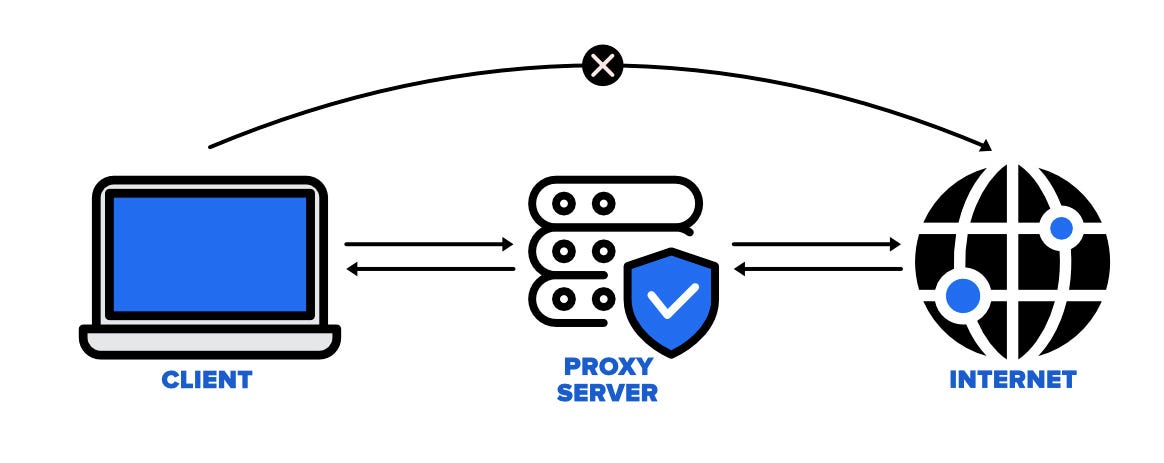
A proxy forwards your request to the target and returns the response, so the site logs the proxy's IP instead of yours. In Python that is one argument:
import requests

proxy = "http://user:pass@proxy.example.com:8080"
resp = requests.get(
    "https://example.com/products",
    proxies={"http": proxy, "https": proxy},
    timeout=20,
)
That buys you exactly two things: request volume (many IPs means no single address trips a per-IP rate limit) and geography (an IP in Germany sees German pricing and German search results).
It buys you nothing else. Anti-bot systems also look at your TLS handshake, header order, and JavaScript environment. If a site blocks you on residential IPs, adding more IPs will not help — start with user agent and header rotation instead.
What types of proxies are used for web scraping?
Proxies are classified by where the IP address comes from, and that origin is what anti-bot vendors actually check.
| Type | Priced by | Anti-bot outcome | Speed | Use it for | Where it breaks |
| Shared datacenter | IP/month or requests | Blocked by reputation-based defenses | Fastest | Docs, APIs, sitemaps, small sites | Any site that scores hosting-provider networks |
| Dedicated datacenter | IP/month | Same network problem, but no damage from neighbors | Fastest | Steady crawling of one tolerant target | Still an obvious hosting network |
| ISP / static residential | IP/month | Passes network checks; IP is fixed | Fast | Logged-in sessions, long crawls of one domain | Small pools, so per-IP rate limits bite |
| Rotating residential | GB of traffic | Passes network checks; new IP per request | Medium | E-commerce, SERPs, geo-specific pages | Bandwidth cost; no session continuity |
| Mobile (4G/5G) | IP/month or GB | Highest trust | Slowest | The few targets that block residential too | Cost and throughput; tiny pools |
Datacenter proxies
IPs owned by hosting companies. They are fast and cheap because the underlying resource is cheap, and they are the easiest to identify: anti-bot vendors maintain lists of hosting networks, so a datacenter IP is flagged as "not a person" before your request is even parsed. Fine for the large majority of the web that doesn't run commercial bot protection. See our datacenter proxy provider comparison if you need to buy some.
ISP (static residential) proxies
Machines in a data center holding IP addresses registered to a consumer ISP. Network-reputation lookups say "Comcast subscriber," so they pass the check that kills plain datacenter IPs, while keeping datacenter latency and per-IP pricing. The catch is pool size — providers hold thousands, not millions — so if a site rate-limits per IP you run out of addresses quickly. This is the correct choice for anything that needs a stable IP across a session.
Residential proxies
Traffic routed through real consumer connections. They are the default answer for protected e-commerce and search targets, and they are billed per gigabyte, which changes the economics completely (see the cost section below). Rotating pools give you a fresh IP per request; most providers also offer sticky sessions that hold one IP for a few minutes. Sourcing matters here — residential bandwidth comes from real people's devices, and providers differ a lot in how they obtained consent. Our residential provider roundup and cheapest residential proxies posts cover who sells what.
Mobile proxies
IPs from cellular carriers. Their advantage is structural rather than technical: carriers put thousands of subscribers behind a single address via CGNAT, so blocking one mobile IP means blocking a neighborhood's worth of real customers. Sites are correspondingly reluctant to do it. You pay for that with the slowest connections, the smallest pools, and the highest prices of any type. Use them for the specific targets that beat residential, not as a default.
What about free proxy lists?
Public proxy lists are useful for exactly one thing: learning how proxy code works before you pay for anything. They are shared with everyone, mostly dead within hours, frequently already blocked by the sites you care about, and you have no idea who operates the exit node — never route authenticated traffic through one. We keep an honest assessment of free proxy lists if you want the details.
HTTP vs SOCKS5, shared vs dedicated, rotating vs sticky
Three more axes cut across the taxonomy above. They're often presented as proxy "types," but they're configuration choices you make on any of them.
Protocol. HTTP proxies understand HTTP and tunnel HTTPS with CONNECT; SOCKS5 forwards arbitrary TCP and can resolve DNS on the proxy side, which prevents DNS leaks that reveal your real location. For scraping, HTTP is fine unless you need non-HTTP traffic or remote DNS. Almost every provider offers both on the same pool.
Exclusivity. A shared IP is used by other customers, so someone else's behavior determines whether it's already banned on your target. A dedicated IP costs several times more and is only worth it when you need predictable reputation — logged-in sessions, or a target where earning trust takes time.
Rotation mode. Rotating gives you a different IP per request. Sticky holds one IP for a fixed window (typically up to 10–30 minutes, depending on the provider). Pick by what the page needs: anonymous listing and detail pages want rotation, anything carrying a session cookie wants stickiness. Mixing them up is the most common cause of "the proxies work but the scraper keeps getting logged out."
Which proxy type should you use?
Work down this ladder and stop at the first rung that works. Every step up costs meaningfully more.
- No proxy. If you're pulling a few thousand pages from a cooperative site, a single IP with polite rate limiting is fine. Check for a public API or a sitemap first.
- Shared datacenter. The default for volume. Cheap enough that you can hold hundreds of IPs and rotate freely. If success rates stay high, stop here — most of the web has no bot protection at all.
- Dedicated datacenter or ISP. Move here when shared IPs arrive pre-banned, or when you need a stable identity for a logged-in session. ISP specifically when the failure is network-reputation-based: your requests get 403s immediately, regardless of rate.
- Rotating residential. Move here when the target responds to datacenter traffic with 403s, CAPTCHAs, or silently different content — typically major retailers, search engines, travel sites, and anything fronted by a commercial bot-management vendor. Budget by bandwidth, not by request count.
- Mobile. Only for targets that block residential too. In practice this is a short list.
Two rules that save real money:
- Decide per target, not per project. A price monitoring pipeline covering forty retailers usually needs residential for four of them. Routing all forty through residential multiplies your bill by roughly the residential/datacenter rate ratio for no benefit.
- Downgrade as well as upgrade. Sites change their defenses in both directions. Re-test a target on datacenter proxies every month or two.
How to rotate proxies without burning your pool
The mistake is tracking proxy health globally: one 403 from a retailer marks an IP dead and you throw away an address that works fine everywhere else. Track failures per (proxy, host) pair instead.
import random
from collections import defaultdict
from urllib.parse import urlparse

import requests

BLOCK_CODES = {403, 429, 503}


class ProxyPool:
    def __init__(self, proxies, max_failures=3):
        self.proxies = list(proxies)
        self.max_failures = max_failures
        self.failures = defaultdict(int)  # (proxy, host) -> consecutive failures

    def _live(self, host):
        live = [p for p in self.proxies
                if self.failures[(p, host)] < self.max_failures]
        if not live:
            raise RuntimeError(f"all proxies burned on {host}")
        return live

    def get(self, url, **kwargs):
        host = urlparse(url).netloc
        proxy = random.choice(self._live(host))
        try:
            resp = requests.get(
                url,
                proxies={"http": proxy, "https": proxy},
                timeout=20,
                **kwargs,
            )
        except requests.RequestException:
            self.failures[(proxy, host)] += 1  # proxy itself is unreachable
            return None

        if resp.status_code in BLOCK_CODES:
            self.failures[(proxy, host)] += 1  # burned on this host only
            return None

        self.failures[(proxy, host)] = 0  # a success clears the counter
        return resp


pool = ProxyPool([
    "http://user:pass@1.2.3.4:8080",
    "http://user:pass@5.6.7.8:8080",
])

for page in range(1, 6):
    resp = pool.get(f"https://example.com/products?page={page}")
    if resp:
        print(page, len(resp.text))
Three details worth keeping when you adapt this:
- A success resets the counter. Consecutive failures indicate a block; scattered failures are just the internet.
- Distinguish connection errors from block responses. A
RequestExceptionmeans the proxy is down and should be retired everywhere; a 403 means it's burned on one host. - Rate-limit per IP, not per pool. Ten proxies at one request per second each is ten requests per second at the target — well past what many sites tolerate.
What do proxies actually cost?
Compare pricing models before you compare rates, because they scale on completely different variables.
- Per IP per month (datacenter, ISP, most mobile): cost is fixed by pool size. Scraping more pages through the same IPs is free.
- Per gigabyte (residential, some mobile): cost scales with bytes transferred. Page weight is now a line item.
That second model catches people out. A modern retail product page is commonly 1–3 MB of HTML plus assets. At 2 MB per page, 100,000 pages is roughly 200 GB — and residential bandwidth is billed by the gigabyte. Two mitigations, in order of impact:
- Block images, fonts, media, and analytics in your browser or client. On asset-heavy pages this removes most of the bytes.
- Fetch HTML without JavaScript where possible. If the data is in the server-rendered HTML, skip the browser entirely.
For provider-by-provider pricing, see our proxy provider comparison — this post deliberately doesn't rank vendors.
Letting an API pick the proxy for you
Proxy selection, rotation, retries, and browser rendering are all plumbing. If you'd rather not maintain them, WebScraping.AI exposes the choice as a single parameter:
import requests

resp = requests.get(
    "https://api.webscraping.ai/html",
    params={
        "api_key": "YOUR_API_KEY",
        "url": "https://example.com/product/123",
        "proxy": "residential",  # datacenter (default) | residential | stealth
        "country": "de",
        "js": "true",
    },
    timeout=60,
)
print(resp.text)
Same call with curl:
curl -G https://api.webscraping.ai/html \
  --data-urlencode "api_key=YOUR_API_KEY" \
  --data-urlencode "url=https://example.com/product/123" \
  --data-urlencode "proxy=residential" \
  --data-urlencode "country=de"
Pricing follows the same escalation ladder, in credits per request:
proxy | Without JS rendering | With JS rendering |
datacenter (default) | 1 | 5 |
residential | 10 | 25 |
stealth | 50 | 50 |
Failed requests are not billed, so probing a new target with datacenter and falling back to residential on failure costs you nothing for the attempts that don't work. The multipliers are published up front, which is the point — you can compute a monthly bill before you write the scraper. AI field extraction adds 5 credits on top. Full parameter list is in the API docs.
For Google specifically, the stealth proxy plus the SERP scraping guide is the relevant combination.
Frequently asked questions
What's the real difference between residential and datacenter proxies?
Where the IP is registered. Datacenter IPs belong to hosting companies and are trivially identified as such; residential IPs belong to consumer ISPs and look like ordinary visitors. The practical consequences are speed (datacenter wins), price (datacenter wins by a wide margin), and pass rate against bot protection (residential wins).
How many proxies do I need?
Work backwards from the target's per-IP tolerance. If a site rate-limits at roughly 60 requests per minute per IP and you want 600 requests per minute, you need at least 10 IPs — and realistically 2–3× that, so no single IP sits at the ceiling. For rotating residential pools this is moot; you're buying bandwidth, not addresses.
Which proxy type works for scraping Google?
Search engines are among the most aggressively defended targets on the web. Datacenter IPs are effectively useless; residential works with careful pacing, and stealth-tier or mobile proxies are what you reach for at volume. Expect to handle CAPTCHAs and consent interstitials regardless of proxy type.
Is using proxies for web scraping legal?
Using a proxy is not itself unlawful — it's ordinary network infrastructure. What matters is what you scrape, whether you circumvent authentication or technical access controls, what the site's terms say, and how you handle personal data. The answer varies by jurisdiction and by case, so read our overview of whether web scraping is legal rather than taking a one-line answer from anyone.
Do proxies stop CAPTCHAs?
They reduce them, because most CAPTCHA triggers are IP-reputation-based. They don't eliminate them. If you're still seeing CAPTCHAs on clean residential IPs at a low request rate, the trigger is your client fingerprint, not your address.
Where to go next
Match the proxy to the target, not to your anxiety about the target. Start at datacenter, measure, and escalate only where the numbers say to. If you'd rather skip the pool management entirely, WebScraping.AI's free tier includes 2,000 credits per month with no credit card — enough to test the same target across all three proxy tiers and see which one your site actually requires. Get an API key and try it.
